Clamiga 0.11 and Clamacs
Clamiga 0.11 and Clamacs
The last post introduced Clamiga, my Common Lisp for the Amiga. That was version 0.6, at the end of July. Since then there were five more releases, 0.7 up to 0.11, and quite a few things changed. This post goes through the ones I think are worth talking about.
The second half is about Clamacs, an Emacs-inspired editor and IDE for Clamiga. It is written in Common Lisp, runs natively on AmigaOS 3 and MorphOS, and also on macOS and Linux. It ships with the Clamiga binary release since 0.10.
As before, the project lives on GitHub, and the ready-made AmigaOS 3 and MorphOS binaries are on Aminet.
What's new in Clamiga since 0.6
TLS, finally
In the last post I wrote that Drakma and Hunchentoot have to run without SSL because a binding to an Amiga SSL library was missing. This is solved since 0.7. Clamiga has a native TLS layer now: (ext:socket-start-tls stream) upgrades a connected socket to TLS in place, as client or as server, with certificate and hostname verification. The provider is loaded at runtime and is optional: OpenSSL on macOS and Linux, AmiSSL v5 on AmigaOS and MorphOS.
On top of that there is a small cl+ssl facade that is registered automatically when ASDF loads. So Drakma does HTTPS and Hunchentoot serves HTTPS out of the box, without any change to those libraries. The HTTPS test suite of Hunchentoot runs with Drakma as the client, so Clamiga is both ends of the encrypted connection.
MUI and ReAction from Lisp
0.6 had Lisp bindings for Intuition, Graphics and GadTools. That is enough for simple windows, but modern Amiga GUIs are built with MUI (on classic AmigaOS and MorphOS) or ReAction (on AmigaOS 3.2 and 3.5+). Both are available from Lisp now.
The MUI module covers the whole thing: objects are created by class name, notifications are set up with notify, there is an application event loop, and requesters. Hooks and custom classes are Lisp functions. So a MUIA_Group_LayoutHook can be a Lisp function, and a custom class can have a dispatcher written in Lisp that handles MUIM_Draw or MUIM_HandleInput. The MUI SDK examples were ported to Lisp and are in examples/amiga/mui/.
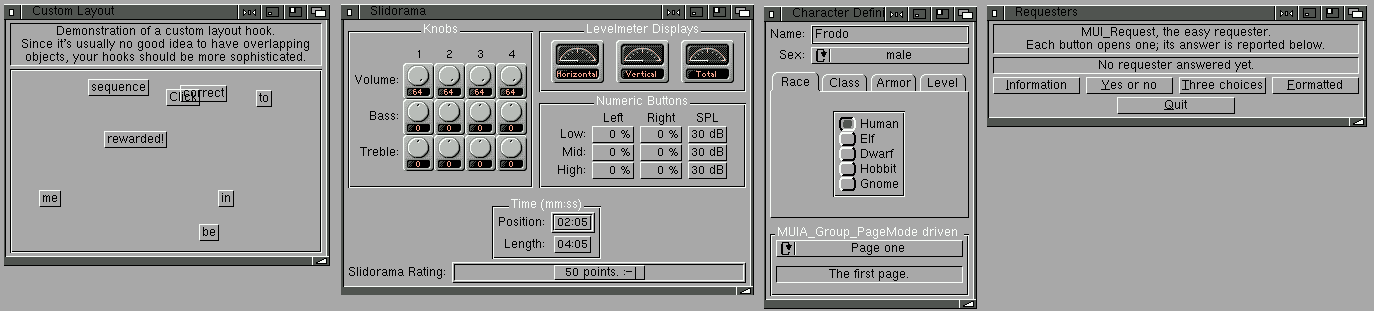
Here are four of them on AmigaOS 3.9 with MUI 3.8. Every levelmeter and slider in the slidorama example is an instance of a MUI custom class whose dispatcher is a Lisp function:
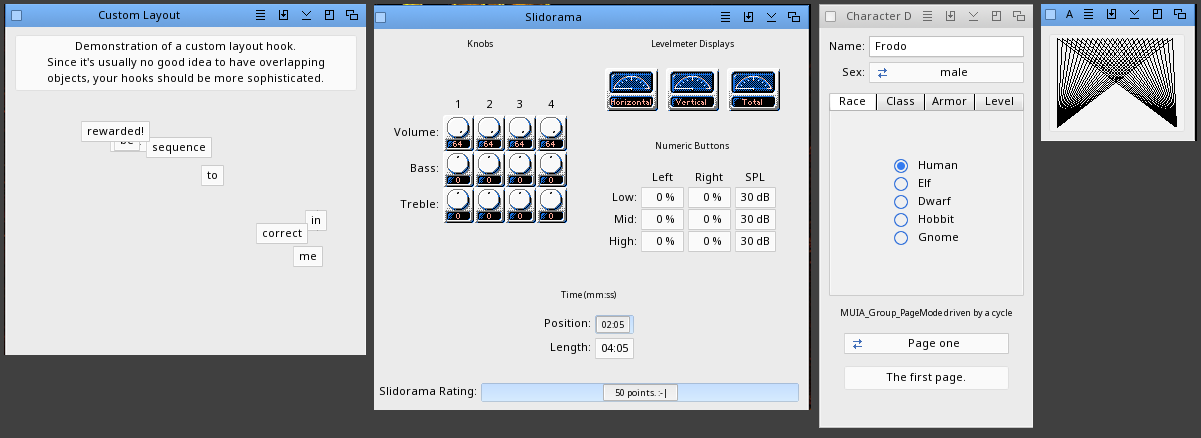
The same programs on MorphOS 3.20 with MUI 4:
And four of the ReAction examples from the NDK 3.2, ported to Lisp, on AmigaOS 3.2:

A small MUI program looks like this. If you know MUI from C, you will recognise everything:
(require "amiga/mui")
(require "amiga/raw/muimaster")

(defpackage "HELLO-MUI"
  (:use "CL")
  (:local-nicknames ("MUI" "AMIGA.MUI") ("M" "AMIGA.RAW.MUIMASTER")))
(in-package "HELLO-MUI")

(mui:with-foreign-pool ()
  (let* ((ok  (mui:make-object :button "_OK"))
         (win (mui:new-object :window
                m:+muia-window-title+ "Hello from Lisp"
                m:+muia-window-id+    (mui:make-id "HELO")
                m:+muia-window-root-object+
                (mui:new-object :group
                  m:+muia-group-child+
                  (mui:new-object :text m:+muia-text-contents+ "Hello, MUI!")
                  m:+muia-group-child+ ok)))
         (app (mui:new-object :application
                m:+muia-application-title+  "HelloMUI"
                m:+muia-application-base+   "HELLOMUI"
                m:+muia-application-window+ win)))
    (unwind-protect
         (progn
           (mui:notify win m:+muia-window-close-request+ t
                       :application m:+muim-application-return-id+
                       m:+muiv-application-return-id-quit+)
           (mui:notify ok m:+muia-pressed+ nil
                       :application m:+muim-application-return-id+ 1)
           (mui:set-attrs win m:+muia-window-open+ t)
           (mui:do-application-events ((id) app)
             (case id (1 (format t "OK pressed~%")))))
      (mui:dispose-object app))))
Bindings for every OS library
The hand-written modules only cover a part of the OS. Since 0.8 there are also generated bindings for every library, device and BOOPSI class of the AmigaOS 3.2 NDK, plus MUI, AHI and the MorphOS SDK additions. One Lisp function per C function, one constant per #define, loaded on demand with (require "amiga/raw/asl") and so on. They are not Lisp-shaped, you get C structures and tag lists, but nothing in the OS is out of reach anymore.
This had a cost at first: all those bindings took 1.42 MB of heap. That was reduced to 0.18 MB by making the binding tables lazy, names are interned when a program first mentions them. On an 8 MB Amiga this matters.
Audio: AHI and real hardware
The audio.device module from 0.6 worked in the emulator but was silent on real AmigaOS 3 hardware. That is fixed. New since 0.9 is an AHI module, opt-in, with 8 and 16-bit mono and stereo playback at any rate from any memory, gapless double-buffered streaming, and the AHI mixer API. Tested on real MorphOS hardware.
Heap images and standalone executables
This one changes how Clamiga is used in practice. (ext:save-image "app.img") writes the whole session to a file: everything loaded, defined and computed. clamiga --image app.img is back at that state in a single read. No boot, no loads.
On a 14 MHz Amiga this turns a minutes-long Quicklisp warm-up into a near-instant start. The binary release uses it for itself: every binary has a clamiga.img next to it, so startup restores the boot image instead of loading the boot FASLs. In FS-UAE on a 68040 config that is 40 ms instead of 740 ms.
Since 0.11 an image can also be a program of its own:
(load "app.lisp")
(ext:save-image "app" :executable t :toplevel 'app:main :quit t)
This writes one file, a copy of clamiga with the image appended, that needs no lib/, no image file and no launcher beside it. It starts from the Shell or from a Workbench icon, and the command line belongs to the program. So you can ship a Lisp program as a single executable. The executable runs on the kind of machine that saved it, so each platform builds its own: save on AmigaOS for an AmigaOS program, on MorphOS for a MorphOS program, and so on.
JIT: lazy, with direct calls, and now also for arm64
The m68k JIT from 0.6 compiled every function at definition time. Since 0.11 it is lazy: a function is compiled on its 8th call, or on its first call when it contains a loop. Code that runs once, like most of what runs while a program loads, stays bytecode and costs no native-code memory.
The bigger change is how native code calls native code. A call from a native function to another native function now jumps straight into that function's code, through a call-site cell, without going back to the VM. The lambda list can have &optional, &rest and &key parameters. On the FS-UAE 68040 config a loop iteration that calls a native function takes about 1 microsecond, against 13 in the interpreter. Tail calls, non-local exits and native frames with line numbers in the backtrace are also handled.
And there is a second backend: arm64 macOS and Linux hosts get an AArch64 JIT with the same compile-when-hot policy. It is a simpler template JIT, but a fixnum loop runs about 14 times faster than bytecode, and native to native calls about 6 times faster. x86-64, Windows and MorphOS still run the bytecode VM.
Performance in general
0.10 had a larger performance round that is not JIT-related: a few runtime taxes were removed, the call and unwind protocol was rebuilt, fourteen fused superinstructions were added to the VM, and locks and condition variables became plain heap objects. The last one means an actor system with thousands of in-flight messages is just allocation, no OS mutex per lock, no limit.
Measured with the Sento actor benchmark on the host, 0.10 was between 50% and 360% faster than 0.8, depending on the cell. 0.11 holds those figures. The numbers and how they were measured are in docs/benchmarks.md in the repo.
Smaller things
- Hard-float build: the release ships a second AmigaOS 3 binary compiled for the 68881/68882 FPU. Double arithmetic is native instead of soft-float library calls. Much faster on a 68040, 68060, Vampire or PiStorm, but it requires an FPU.
- Unicode: the MorphOS build has full Unicode strings now, like the host build. The m68k build stays 8-bit by default to keep the 8 MB baseline lean, but there is a
WIDE=1build option for big-RAM machines, which is what flexi-streams and Drakma need to load. - Windows:
make hostbuilds a native Windows executable from an MSYS2 shell. Threads, sockets, TLS, FFI, everything a POSIX host has. - Memory on the Amiga: the memory footprint was improved, and memory allocated outside the heap is now properly returned to the system at exit.
- Debugger and REPL: backtraces show real function names now, the
<anonymous>bug from the last post is gone.defmethodbodies show under the generic function's name,fletandlabelslocals under their own names. Ctrl-D at theDebug>orInspect>prompt returns to the caller instead of ending the session.(values)prints nothing, and every value a form returns is printed on its own line. - Ctrl-C while Lisp code is running enters the debugger with a backtrace of the interrupted computation and a
CONTINUErestart. - AmigaGuide documentation: the release ships its docs as AmigaGuide files with Workbench icons, readable with MultiView on the Amiga. The converter from Markdown to AmigaGuide is written in Lisp and runs with clamiga itself.
- Workbench: clamiga starts from an icon, with
ARGSandWINDOWtool types instead of a command line. The release has six launcher icons, one pair (CLAmiga and Clamacs) per binary. - CPU self-test: this one was a surprise. The Apollo 68080 in the Vampire V4 loses a memory store in a certain instruction sequence that gcc emits for ordinary function prologues. Any program fails at random then, differently on every launch. The m68k build replays that sequence a few thousand times at startup and prints a warning when a store is lost. The probes that pinned this down are in the repo if you have such a machine.
The development port
Now to the part that leads to Clamacs. In the roadmap of the last post I wrote: "ARexx port for easier integration with editors to get a similar super convenient workflow as with Emacs and the Slime/Sly plugin."
That exists since 0.7. A running clamiga can open an ARexx port, it does not do so by default. Two lines, at the prompt or in S:.clamigarc, are enough:
(require "amiga/arexx")
(amiga.arexx:start)          ; => "CLAMIGA"
and an editor like CygnusEd or GoldED can send LOAD Work:src/foo.lisp to it and get all compile diagnostics back, with file and line. Over the releases this grew into a full set of commands in the package EXT.DEV: EVAL, COMPILE-FILE, ARGLIST, COMPLETE, DESCRIBE, APROPOS, SOURCE-LOCATION, MACROEXPAND, a REPL thread that streams its output back to the editor and can ask for input, a debugger protocol with backtrace, frame locals, eval-in-frame and restarts, and an inspector protocol.
Since 0.11 the same commands are also served over TCP, on all platforms, with a token for authentication. That is what the host version of Clamacs uses, and it also lets a Clamacs on a Mac drive a clamiga on an Amiga across the LAN.
Clamacs
Clamacs is an Emacs-flavoured Common Lisp editor and IDE for AmigaOS 3, MorphOS, macOS and Linux. The idea is simple: have on the Amiga what SLY gives you in Emacs on the host. Load a file, evaluate a form, see the arglist, complete a symbol, jump to a definition, and when something goes wrong, have the debugger with restarts and a backtrace in a window, not in a shell.
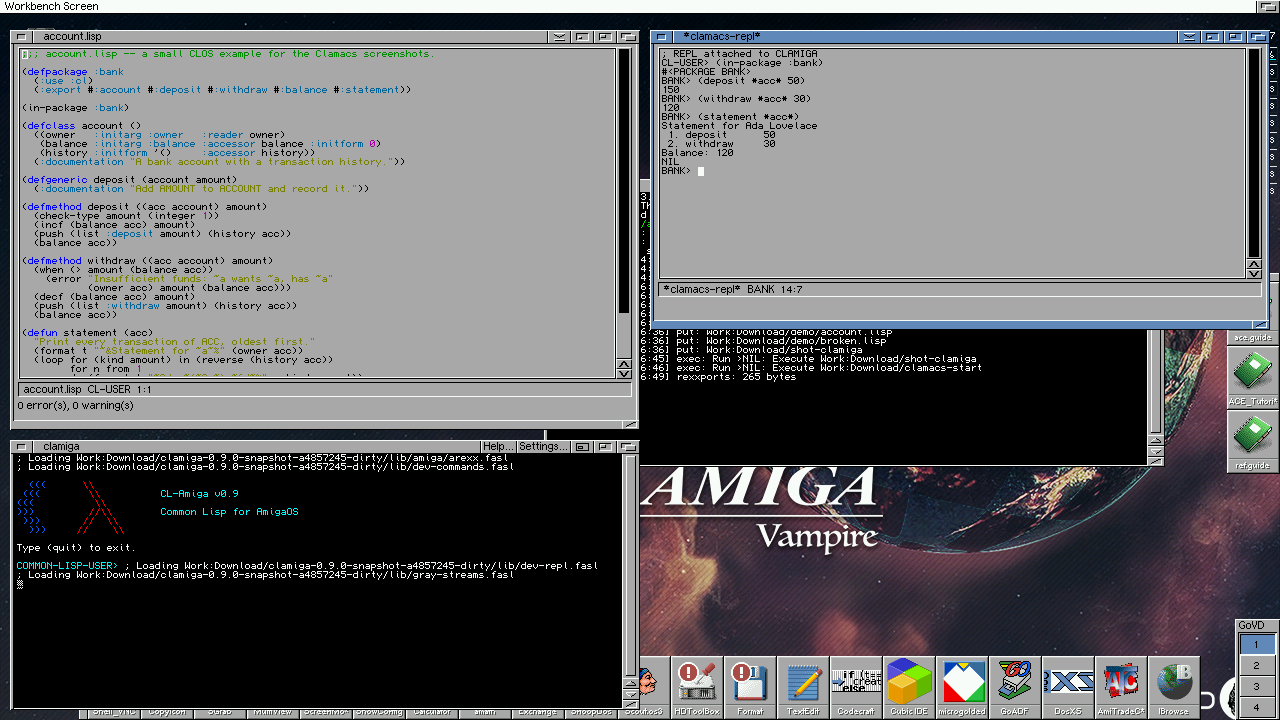
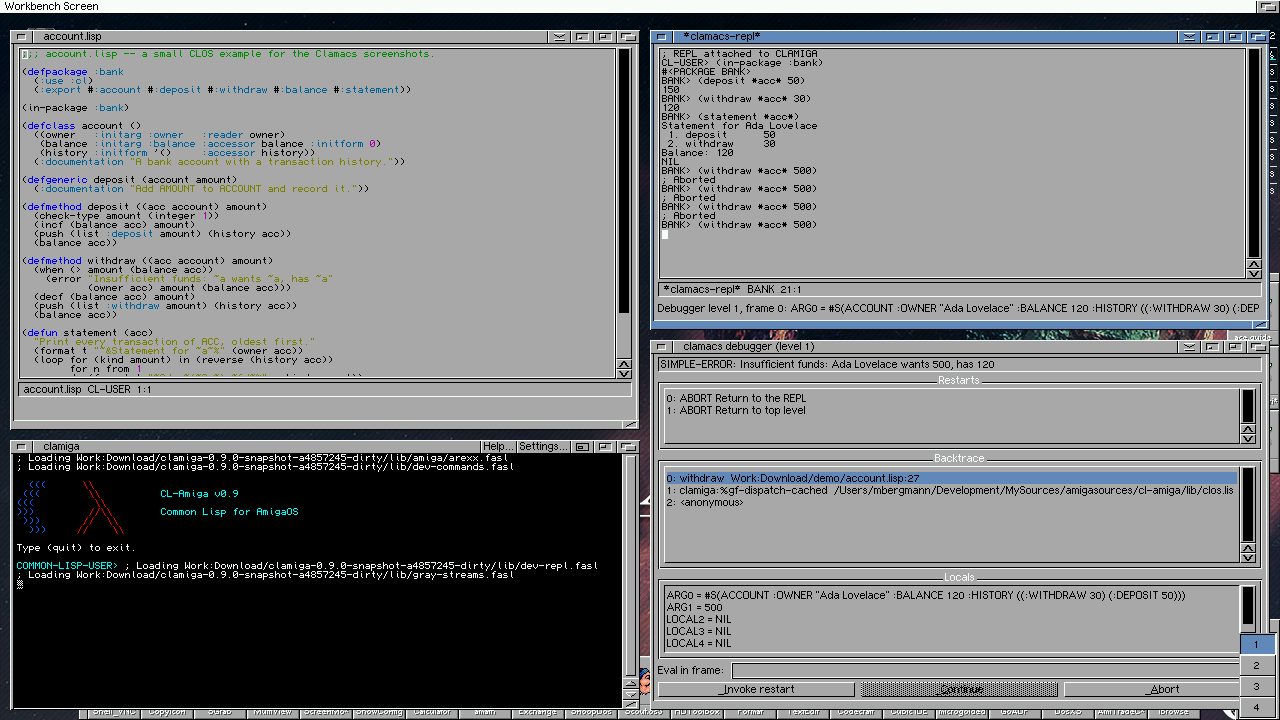
This is Clamacs on a Vampire V4 with AmigaOS 3.2. A file was loaded with C-c C-k, the *clamacs-repl* window talks to the clamiga, and the clamiga console is at the bottom.
How it is built
Clamacs is written in Common Lisp and runs as a clamiga instance of its own. The Lisp you work on lives in a second clamiga that the editor talks to over a wire: the ARexx port on the Amiga, the TCP port on the host. Two processes, so a GC pause, an infinite loop or a crash in your program never freezes the editor.
The first version of Clamacs (0.10) was written in C. For 0.11 it was rewritten in Lisp. Everything Emacs about it, the keys, Lisp mode, the minibuffer, the kill ring, the menus, is the same Lisp code on every platform. What differs is the frontend. On AmigaOS and MorphOS it is a native MUI application that subclasses TextEditor.mcc, with one window per buffer plus windows for the REPL, the debugger, the inspector and the diagnostics. On macOS and Linux it is one native window with the buffers as tabs and a dock below them, built on a webview with CodeMirror 6 as the text component.
The Amiga needs MUI 3.8 or newer and TextEditor.mcc 15.29 or newer. MorphOS ships both.
Editing
The keys are the Emacs keys. C-x C-f opens a file, C-x C-s saves it, C-SPC sets the mark, C-w and M-w cut and copy, C-y yanks and M-y cycles the kill ring. The platform keys work too, right Amiga-X, -C, -V on the Amiga and Command on the Mac, and every kill goes to the system clipboard.
Lisp mode gives syntax colouring, paren matching and indentation. RET is newline-and-indent. On a slow machine, colouring and paren matching can be switched off with M-x clamacs-toggle-syntax-colouring and M-x clamacs-toggle-paren-matching. The choice is remembered as a (syntax-colouring nil) or (paren-matching nil) form in the init file.
The minibuffer completes everything: M-x commands, file names, themes, symbols. TAB puts in the common prefix and lists the candidates, TAB again cycles through them. When no command starts with what was typed, the ones that contain it are offered instead.
Talking to clamiga
C-c C-c evaluates the defun under the cursor on clamiga's REPL thread. What it prints goes to the REPL transcript, the values to the echo area. C-x C-e evaluates the last sexp, C-c C-r the region. C-c C-k loads the whole file. Every error in the file becomes a row in the diagnostics window, and a click on a row, or C-x `, puts the cursor on the offending line.
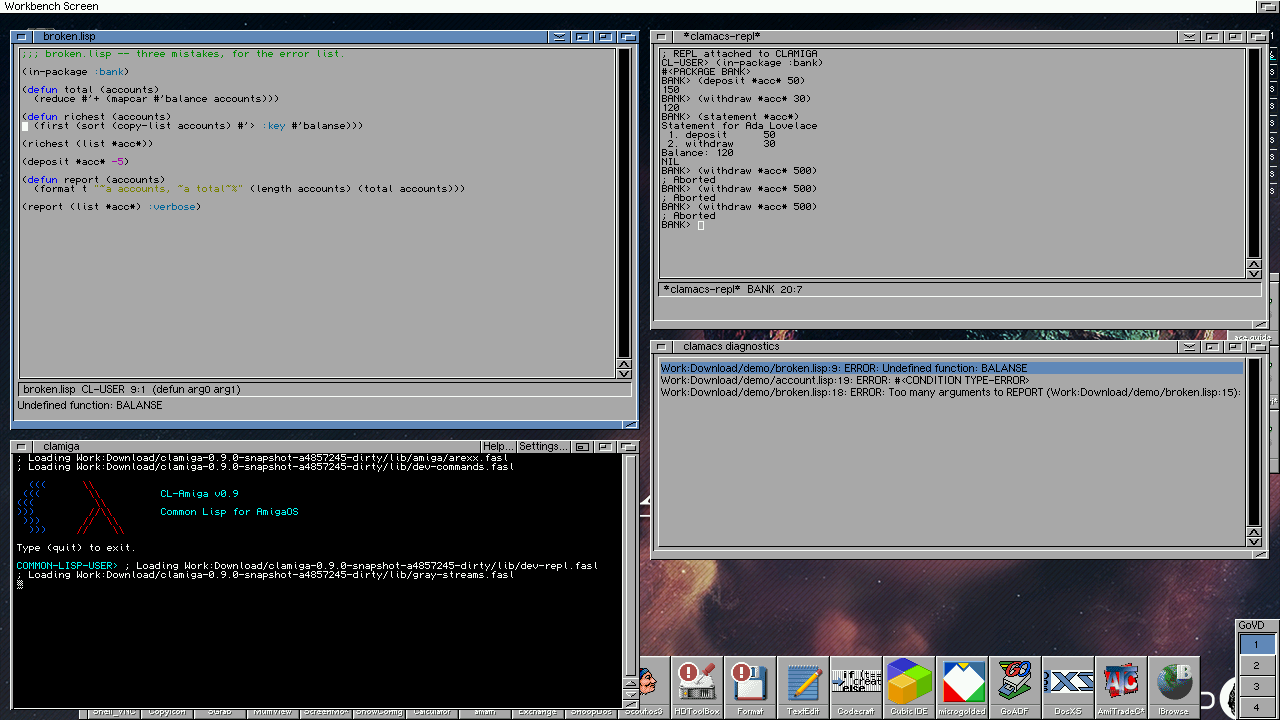
While you type, the status line shows the arglist of the function at the cursor. M-TAB completes a symbol, M-. jumps to the definition, and there are commands for describe, apropos and macroexpand.
C-c C-z opens the REPL window. It is a real REPL: the output arrives as it happens, a read-line in your code asks the editor for input, the history variables *, ** and + are kept, and C-c C-b interrupts a running form.
Debugger and inspector
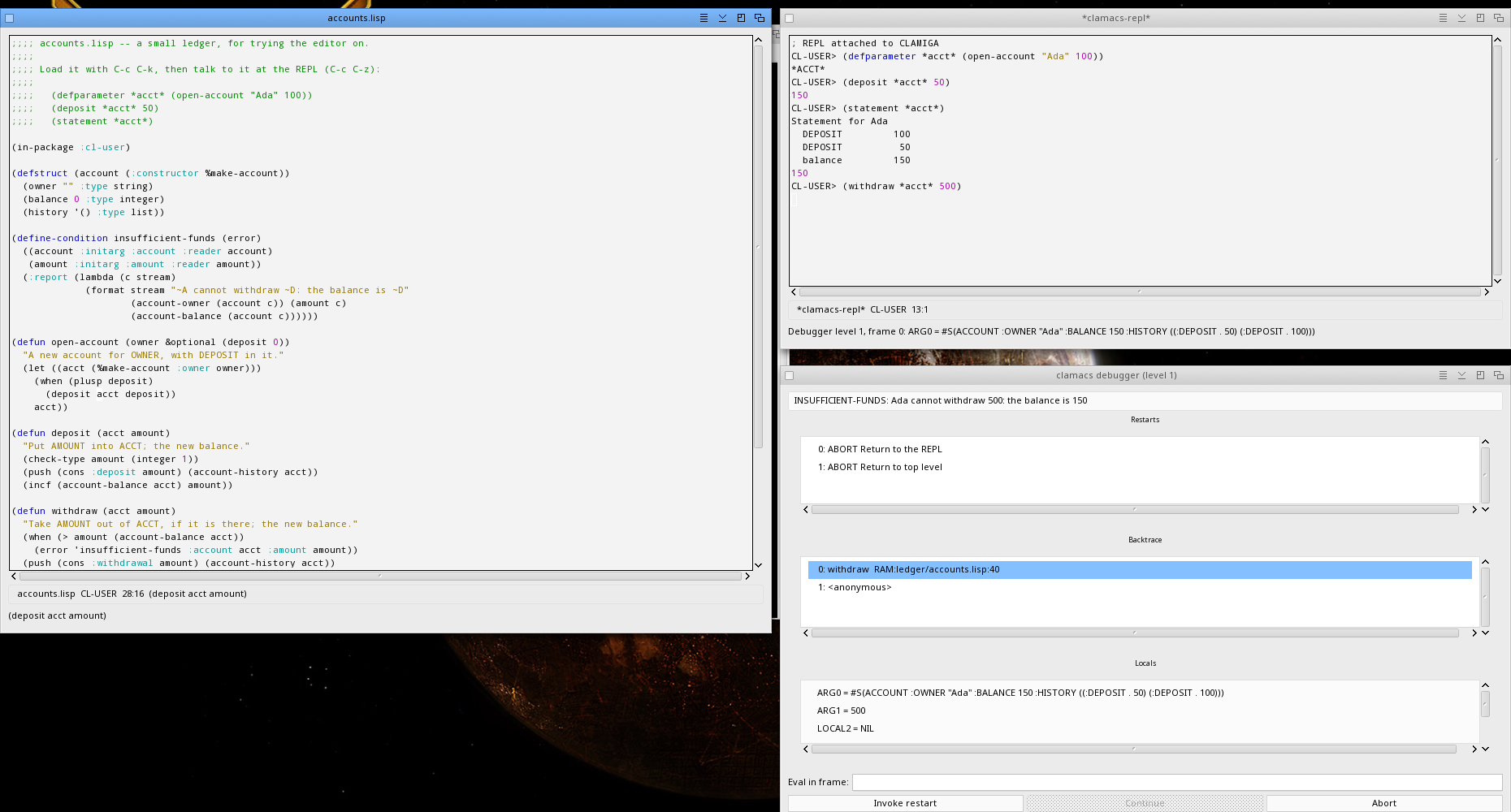
When a form signals an error, clamiga's REPL thread stays on the erring stack and the debugger window opens: the condition, the restarts, the backtrace, the locals of the selected frame, and a line to evaluate an expression in that frame. You pick a restart and the program continues from there, the same as in SLY's SLDB.
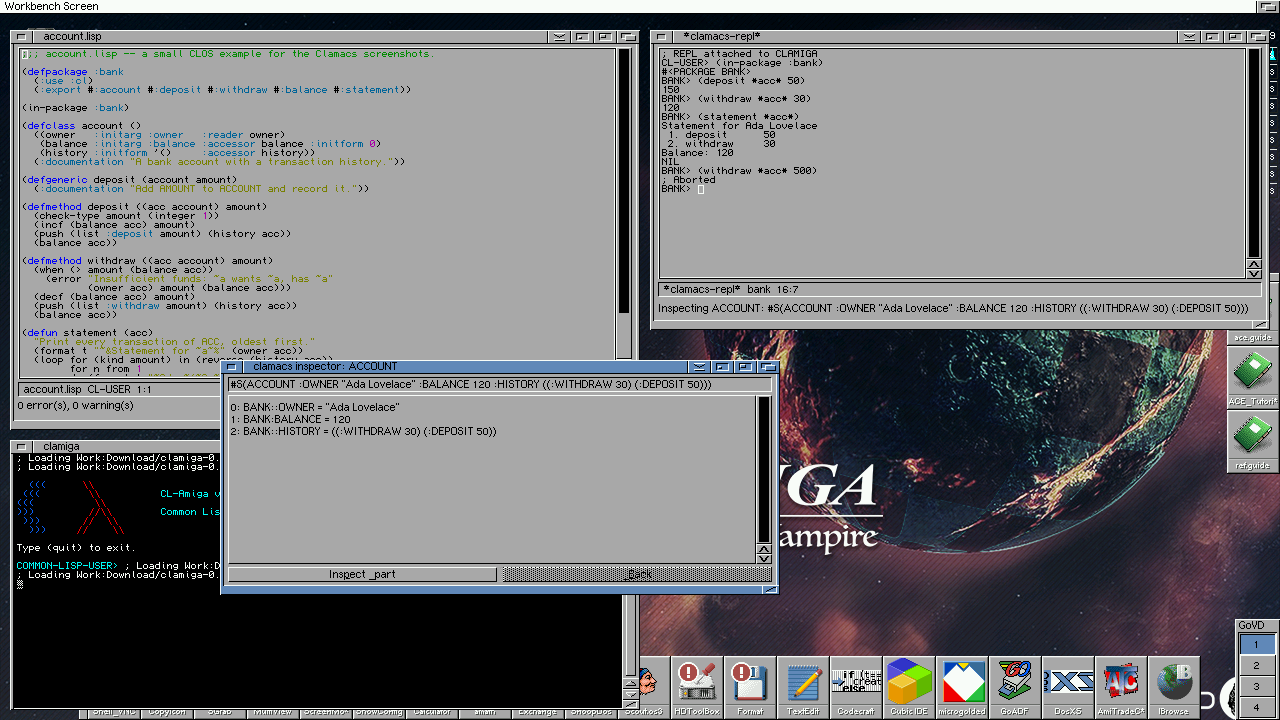
C-c I evaluates a form and opens the inspector on its value. A part descends, Back comes up.
The same on MorphOS 3.20, with MUI 4: a file loaded, the REPL window, and the debugger window an error at the prompt opened:
ASDF systems
The ASDF menu loads whole systems. Load System takes the .asd in the window, or the nearest one in the directories above the file, and has clamiga load ASDF, the definition and the system with everything it depends on. Test System runs asdf:test-system. The compiler output streams into the transcript, and an error opens the debugger. On a 68k Amiga the menu is left out, because ASDF needs more memory than most of these machines have, and compiling it takes a lot of CPU time. The commands are still there for a machine that is fast enough and has the memory.
Themes, text size, windows
There are six colour themes: Light, Dark, Solarized Light and Dark, One Dark and Gruvbox Dark. A theme of your own is a define-theme form in the init file. C-x C-+ and C-x C-- change the text size. Snapshot Windows writes the position and size of every open window to a file and the windows come up there from then on.
The init file
S:.clamacsrc on the Amiga, ~/.clamacsrc on the host, is loaded before the first window opens, in the CLAMACS package. It can define commands and bind keys:
(define-command insert-date (doc arg)
  (declare (ignore arg))
  (doc-insert doc (multiple-value-bind (s m h d mo y) (get-decoded-time)
                    (declare (ignore s m h))
                    (format nil "~D-~2,'0D-~2,'0D" y mo d))))
(bind-key "C-c d" 'insert-date)
A command is just a function of the document and the numeric argument. M-x, the menu and the editor's own port all find it by name.
Talking to the editor itself
Because the editor is a clamiga, you can point the REPL, the debugger and the inspector at the editor's own image: Clamiga > Talk to the Editor Itself. Redefine one of the editor's functions at that prompt, or load one of its source files, and the running editor has it. This is how Emacs works, and it is how Clamacs is developed.
On the host
The same editor runs on macOS and Linux. host/run.sh file.lisp starts it from a checkout, and make host-app builds a Clamacs.app on a Mac. The menus are on the screen's menu bar, Option is Meta. The tools that are separate windows on the Amiga live in a dock below the buffers: the REPL and other tool buffers as tabs, the Diagnostics, Debugger and Inspector as panels. Any tab can be detached into a window of its own. There is also a minimap at the right edge of a source buffer.
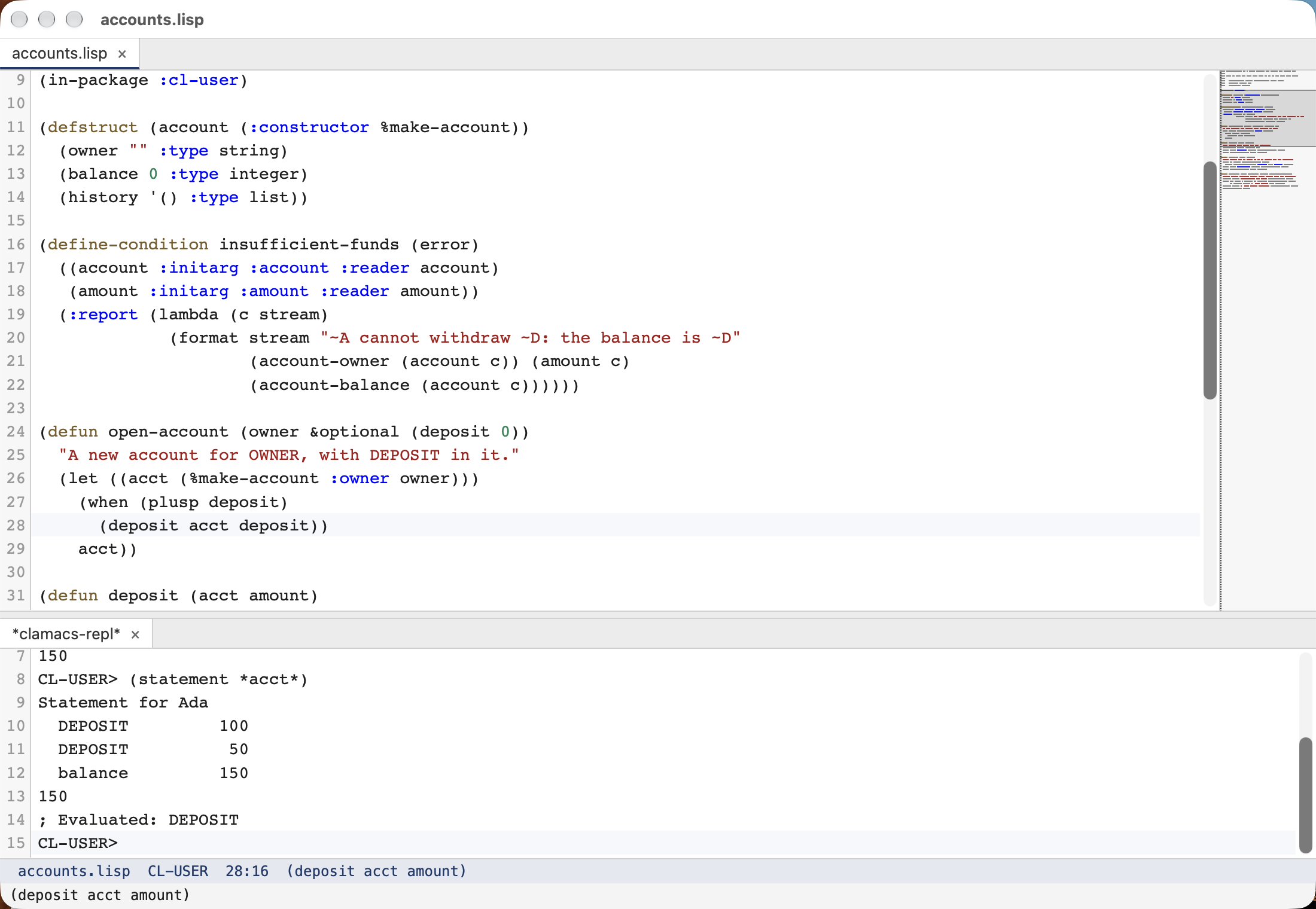
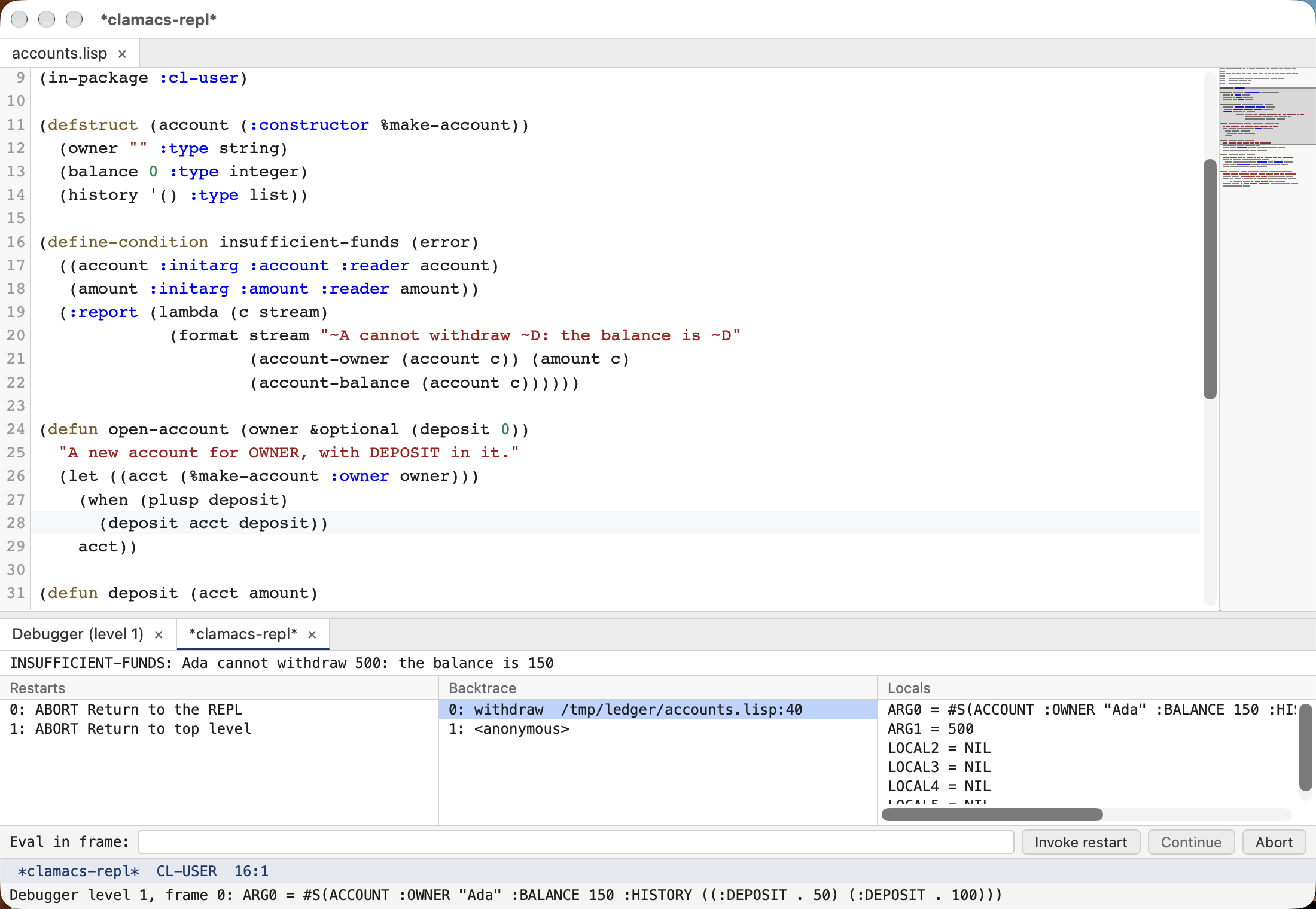
I use this version for most of the Clamacs development itself. The Amiga version is the same code, so what works on the Mac usually works on the Amiga.
Starting it
From the binary release, the Clamacs Workbench icon starts the editor from its heap image. From a Shell:
clamiga --image clamacs.img --non-interactive --eval "(clamacs::run)" -- file.lispThe editor connects to a clamiga whose ARexx port is open, or starts one itself when there is none: Clamiga > Start clamiga, which the first C-c C-c offers to do. That clamiga runs on the same binary with your S:.clamigarc loaded, so no setup is needed. On the host it is the same, over TCP.
Status
Clamiga is still alpha. The core language is solid for what it does, real libraries load and pass their test suites, and the Amiga test suite in FS-UAE runs over 5000 checks on every release, on the soft-float and the FPU binary. ANSI conformance is still incomplete, the Paul Dietz test suite is the working spec. The library forks (bordeaux-threads, usocket, cffi and friends) are still forks, the goal is to upstream them once the remaining gaps close.
Clamacs is young. The Lisp rewrite is a few weeks old. It works for me on a Vampire V4, on MorphOS and on the Mac, but there will be rough edges.
Roadmap
A native AmigaOS 4 build is the obvious next target on the MorphOS path. More ANSI compliance. More Lisp-shaped modules on top of the raw OS bindings where it makes sense. And Clamacs will get whatever I miss while using it.
Conclusion
0.6 was a Common Lisp that runs on the Amiga. 0.11 is a Common Lisp with HTTPS, MUI and ReAction GUIs, AHI audio, heap images, standalone executables, a much better JIT, and an IDE that runs on the Amiga itself. I think that is a reasonable place to be after a summer.
Clamiga is on GitHub, Clamacs is here, and the binaries for AmigaOS 3 and MorphOS are on Aminet. Bug reports, feature requests, and curious REPL sessions are welcome.
-
[Clamiga 0.11 and Clamacs]
07-10-2026 -
[Clamiga - Common Lisp for the Amiga]
31-07-2026 -
[ACE BASIC 3.0.1 - Variable Arrays and 68000 Compat]
14-05-2026 -
[ACE BASIC 3.0 - Classes IEEE and More]
02-03-2026 -
[ACE BASIC - Structs RTG and More]
16-02-2026 -
[Developing with AI - Understanding the Context]
13-02-2026 -
[ACE BASIC - Closures MUI and More]
10-02-2026 -
[ACE BASIC - GadTools and More]
31-01-2026 -
[ACE BASIC - AGA Screen Support]
27-01-2026 -
[Polymorphism and Multimethods]
02-03-2023 -
[Global Day of CodeRetreat - recap]
07-11-2022 -
[House automation tooling - Part 4 - Finalized]
01-11-2022 -
[House automation tooling - Part 3 - London-School and Double-Loop]
02-07-2022 -
[Modern Programming]
14-05-2022 -
[House automation tooling - Part 2 - Getting Serial]
21-03-2022 -
[House automation tooling - Part 1 - CL on MacOSX Tiger]
07-03-2022 -
[Common Lisp - Oldie but goldie]
18-12-2021 -
[Functional Programming in (Common) Lisp]
29-05-2021 -
[Patterns - Builder-make our own]
13-03-2021 -
[Patterns - Builder]
24-02-2021 -
[Patterns - Abstract-Factory]
07-02-2021 -
[Lazy-sequences - part 2]
13-01-2021 -
[Lazy-sequences]
07-01-2021 -
[Thoughts about agile software development]
17-11-2020 -
[Test-driven Web application development with Common Lisp]
04-10-2020 -
[Wicket UI in the cluster - the alternative]
09-07-2020 -
[TDD - Mars Rover Kata Outside-in in Common Lisp]
03-05-2020 -
[MVC Web Application with Elixir]
16-02-2020 -
[Creating a HTML domain language in Elixir with macros]
15-02-2020 -
[TDD - Game of Life in Common Lisp]
01-07-2019 -
[TDD - classicist vs. London Style]
27-06-2019 -
[Wicket UI in the cluster - reflection]
10-05-2019 -
[Wicket UI in the Cluster - know how and lessons learned]
29-04-2019 -
[TDD - Mars Rover Kata classicist in Scala]
23-04-2019 -
[Burning your own Amiga ROMs (EPROMs)]
26-01-2019 -
[TDD - Game of Life in Clojure and Emacs]
05-01-2019 -
[TDD - Outside-in with Wicket and Scala-part 2]
24-12-2018 -
[TDD - Outside-in with Wicket and Scala-part 1]
04-12-2018 -
[Floating Point library in m68k Assembler on Amiga]
09-08-2018 -
[Cloning Compact Flash (CF) card for Amiga]
25-12-2017 -
[Writing tests is not the same as writing tests]
08-12-2017 -
[Dependency Injection in Objective-C... sort of]
20-01-2011